Enrich DEM with rail
Enrich DEM with railways
Overview
➡️ Insert altimetric points coming from railways into the input DEM. This script works with two input layers:
Digital Elevation Model (DEM) to be enriched
Railways
And four parameters:
Railroads right-of-way (railWidth): Name of column where the railroad right-of-way is stored (Mandatory)
Rail platform height (hRail): Railways platform height (Optional). Default value = 0.5m
Input SRID (inputSRID): SRID of the input tables (Optional)
Output suffix (outputsuffix): suffix applied at the end of the resuling table name (Optional). If not specified, “ENRICHED” is applied
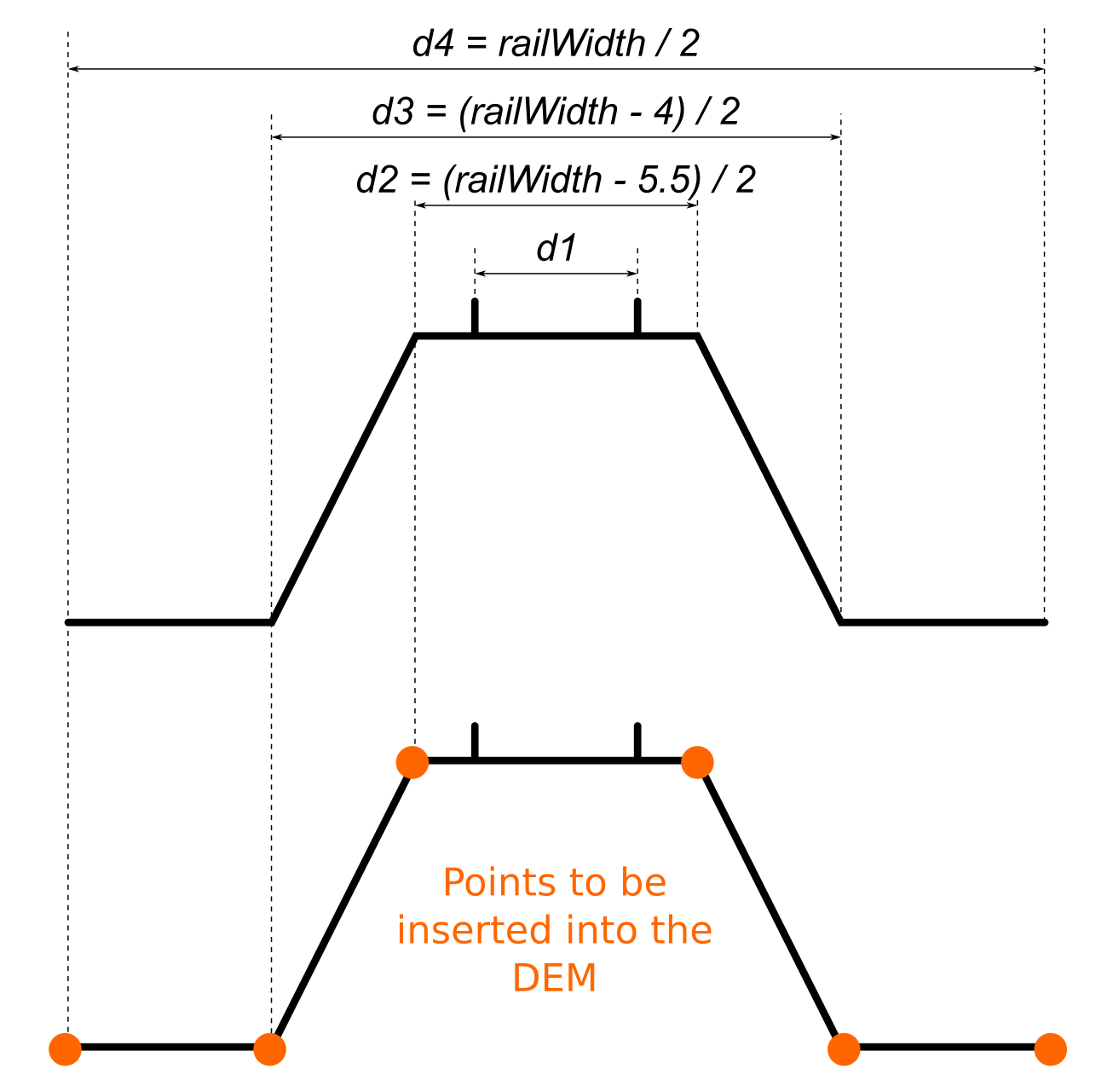
In the schema below, orange points will be inserted into the DEM. d2, d3 and d4 are deduced from the information provided in the parameter railWidth, using the following formula:
d2 = (railWidth - 5.5)/2
d3 = (railWidth - 4)/2
d4 = (railWidth)/2
Arguments
Mandatory inputs
inputDEM— Input DEM tableName of the input DEM table to be enriched
Type:
StringinputRail— Input railways tableName of the input railways table
Type:
StringrailWidth— Railways widthName of column where the railways width is stored
Type:
String
Optional inputs
hRail— Railways platform heightRailways platform height (in meters) (Optional)
Type:
doubleDefault:
0.5inputSRID— Input SRID🌍 SRID of the input tables. 🛠 If not specified, the SRID from DEM layer is applied. If DEM has no SRID, 0 is applied
Type:
Integeroutputsuffix— Output suffixSuffix applied at the end of the resulting table name 🛠 If not specified, “ENRICHED” is applied
Type:
StringDefault:
ENRICHED
Output
result— Result output stringThis type of result does not allow the blocks to be linked together.
Type:
String