Delaunay Grid
Overview
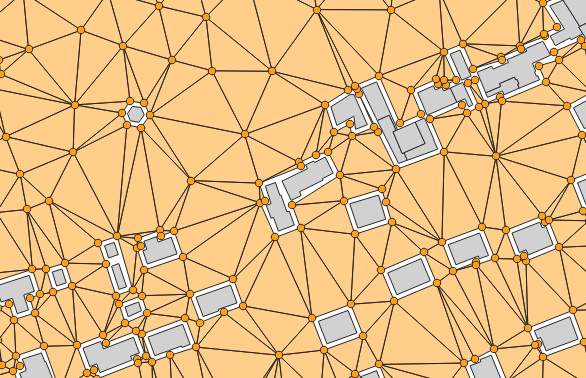
➡️ Computes a Delaunay grid of receivers. The grid will be based on:
the BUILDINGS table extent (option by default)
OR a single Geometry “fence” (Extent filter).
✅ Two tables are returned:
RECEIVERS
TRIANGLES
Arguments
Mandatory inputs
sourcesTableName— Sources table nameName of the Road table. Receivers will not be created on the specified road width
Type:
StringtableBuilding— Buildings table nameName of the Buildings table. The table must contain:
THE_GEOM : the 2D geometry of the building (POLYGON or MULTIPOLYGON)
Type:
String
Optional inputs
buildingBuffer— Minimum distance to buildings (m)Do not add receivers closer than this distance to buildings (in meters)
Type:
DoubleDefault:
2exportTrianglesGeometries— In the triangles table, export triangles geometriesIf enabled, the TRIANGLES table will contain the geometry of each triangle
Type:
BooleanDefault:
falsefence— Extent filterCreate receivers only in the provided polygon (fence)
Type:
GeometryfenceNegativeBuffer— Negative bufferReduce the fence(parameter, or sound sources and buildings extent) used to generate receivers positions. You should set here the maximum propagation distance (in meters) (FLOAT)
Type:
DoubleDefault:
0fenceTableName— Fence table nameUse the extent of a geometry table (e.g., from a shapefile) to limit receiver area
Type:
Stringheight— HeightReceiver height relative to the ground (in meters) (FLOAT)
Type:
DoubleDefault:
4isoSurfaceInBuildings— Create IsoSurfaces over buildingsIf enabled, isosurfaces will be visible at the location of buildings
Type:
BooleanDefault:
falsemaxArea— Maximum AreaSet Maximum Area (in m2) (FLOAT). No triangles larger than provided area will be created.Smaller area will create more receivers
Type:
DoubleDefault:
2500maxCellDist— Maximum cell sizeMaximum distance used to split the domain into sub-domains (in meters) (FLOAT). In a logic of optimization of processing times, it allows to limit the number of objects (buildings, roads, …) stored in memory during the Delaunay triangulation
Type:
DoubleDefault:
600outputTableName— Name of output tableName of the output table. Do not write the name of a table that contains a space
Type:
StringDefault:
RECEIVERSroadWidth— Road widthSet Road Width (in meters) (FLOAT). No receivers closer than road width distance will be created. You can set 0 m if you don’t want to insert roads in the output but still want to skip cells without sources using the ‘Skip cell no sources minimal distance’ parameter
Type:
DoubleDefault:
2skipCellNoSourcesMinimalDistance— Skip cell no sources minimal distanceIf provided, a sub-domain will not be computed if no sources geometries are near x meters from the sub-domain area
Type:
Double
Output
result— Created tableName of the table containing the results of the computation. Can be used as input for another process.
Type:
String